
Grant Access to Support
DLH.io documentation for Grant or Downgrade Access to Support
When working on a support ticket, we may need to access your data to troubleshoot or fix your broken connector or destination. In that case, we will ask you to grant DLH.io access to your data for a limited time. You can allow or deny data access. If you grant us data access, you can revoke it at any moment.
Invite DLH.io Support to Your Organization
Follow the steps below to invite the DLH.io support user to your Organization
- Go to User Invites in DLH.io
- Click the blue Invite Users button
- Enter Onboarding for the First Name
- Enter Support for the Last Name
- Enter onboarding.support [at] DLH.io (using the @ symbol for a valid email) for the Email field
- Select Org Administrator for Role
- Click the blue Save & Invite button
Completed User Invite

Downgrade or Remove Access for Support
Follow the steps below to downgrade or remove access to the DLH.io support user
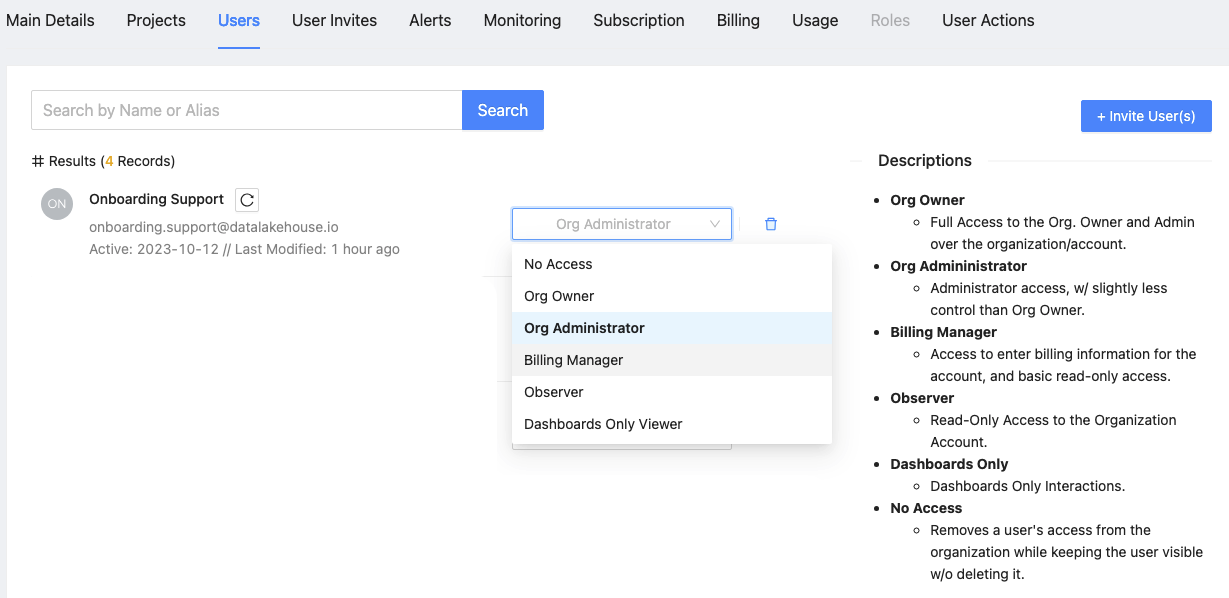
- Go to the Users panel in DLH.io
- Select the desired level of access for the Onboading Support user
- When requested by the support team, this level of access should be "Org Administrator" access. However, once a support ticket has been completed you may later downgrade access by selected Observer or No Access options.
Update October 2025
The support addition is granted by default for enterprise and business critical customers to better aid in immediate support.