
How to Test a SSH Tunnel Connection
DLH.io documentation for How to Test a SSH Tunnel Connection
If you want to test your SSH Tunnel connection for interoperability with DLH.io to ensure DLH.io can reach your database securely behind your SSH server, the outlined instruction below should provide clarity on how to do so.
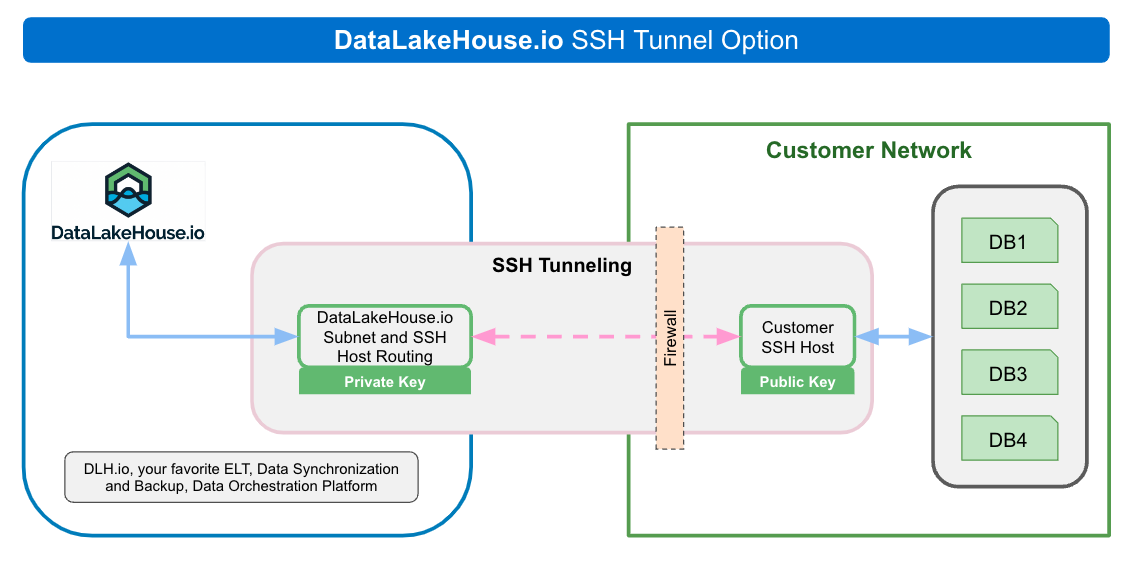
Our Recommendation for Testing
Based on our experience we recommend a few of tests to ensure that DLH.io is able to connect to your databases via SSH protocols. In DLH.io there are two options for connecting from DLH.io to your SSH Server. While the protocol is the same the selectivity of private/public key is different to allow for advanced use cases. Those options are:
- Customer supplied Private Key
- This is the default and currently the preferred method for accounts. This may be later restricted to Enterprise accounts and above.
- To test the connection from one machine to another to emulate how DLH.io will connect to your SSH server :
- Open a terminal window or similar UI application on your local machine, laptop, or virtual machine
- Locate your SSH private key that is associated with the public key on your SSH server
- Enter the standard ssh connection command using the user on the SSH server your key is associated with.
-
ssh dlh_ssh_user@<your_ssh_server_ip_address>If this doesn't connect then you have an issue somewhere in your network most likely. Please confirm any firewall settings and that you have grantlisted/safelisted IPs accordingly. ICMP protocol should be open on the machine as well.
-
ping <your_database_ip_or_dns> -
Use telnet to confirm your terminal commands will actually reach the database via correct port
telnet <your_database_ip_or_dns> <your_database_port>
-
Log any issues and correct them before creating an SSH enabled connection integration on DLH.io or contact support
-
- Done!
- DLH.io supplied Public Key
- Please contact support on how to get a public key if not on the Enterprise plan or not sure/confident on how to createa public and private key in your environment.
SSH Private Key Form Field Format
When entering your Private key in the DLH.io form field please use the full private key BEGIN to END text. For example:
-----BEGIN OPENSSH PRIVATE KEY-----
XXXXXnNzaC1rZXktdjEAAAAABG5vbmUAAAAEbm9uZQAAAAAAAAABAAABlwAAAAdzc2gtcn
NhAAAAAwEAAQAAAYEAw5z4wSn5cL/gglrMgagKkqLixoiue2Pq3DddthjfuWxxgPEquJs1
.....
B7H1piedoisxAUuJJS0g7TvnM/JTXO8J99S9hK3RGajYFStxa7zhDEEjF3OXOKE4SanArQ
JOLHyYnMe1KKoMT72+1myVrmbYot2UP5DkwKQe4s7cL/dunHLK2u5xZGa9lMFLlXvig/oK
fnL616eeyVIaNo6SoP4EBB2fLHIshVrZhCuE3VKDAAAFoIHYqlWB2KpVAAAAB3NzaC1yc2
EAAAGBAMOc+MEp+XC/4IJazIGoCpKi4saIrntj6tw3XbYY37lscYDxKribNX109SEPtuTL
7xHINW4Zzb2tL3g9lrtk3ZL4ImR37pR0z6+3lLmNLuFXvud2CK+rWafxhEZPvt8OmbLOEZ
........
udProutqvGRJUqhNDy0aLDtYCnlKDrdFzGyOMy3vyLnyxqEuIpN1eGeSsRfcQLQVCdUxoO
KPNtMp1H11RQ9ZAAAAJGNocmlzdGlhbkBBSXXXXXNocmlzdGlhbi1NQlByby5sb2NhbAEC
AXXXXXX==
-----END OPENSSH PRIVATE KEY-----
NB: Depending on your connection in DLH.io you may use OpenSSH or a RSA Private Key. Please contact support if you are unsure which to use if assistance is required.
For instructions on how to create a SSH private and public key pair view this section, SSH Tunnel Setup for Hosted Database Systems