
Ceridian Dayforce
DLH.io documentation for Ceridian Dayforce
Ceridian Dayforce is a complete HRIS solution that helps organizations transform every core area of HCM including Continuous payroll, workforce management, benefits, talent management, and more.
DLH.io provides the best data synchronization process from Ceridian into your Data Warehouse or Data Lake Storage so that you can integrate your other financial and operational sources for an enterprise view of your organization.
Setup Instructions
Follow the setup steps guide for configuring your Ceridian Dayforce connection to enable data to flow into your destination via DLH.
Supported Features
Here are key features supported for this connector.
| Sync Feature | Supported | Details |
|---|---|---|
| Custom Data and Development | ✓ | Ability to enhance connector upon request |
| Historical Re-Load/Load | ✓ | |
| Incremental/Delta Load | ✓ | Gets most recent records and changes |
| Column Selection | ✓ | |
| Column Hashing | ✓ | |
| Re-Sync Table/Entity | ✓ | Select at the table level to reload data history (on next Sync Bridge run) |
| Custom Queries | Utilizing SQL Data Query Connector | |
| Custom Data | ||
| Captures Deleted Rows | ✓ | On all supported tables |
| API Sync Bridge Initiation | ✓ | |
| Priority Scheduling | ✓ | |
| Private VPC/Link | ☂ | |
| DLH Data Model Available | - |
If you have any questions about these supported features please reach out to our Customer Support team.
Details on Sync Processing
For this connector, we believe the sync processing is straightforward. We've provided a number of details, steps, and other guidance here and in the setup steps guide. Be sure to also check the change log and notes page from time to time for any changes.
Sandbox & Any Non-Production Environments
If your Dayforce implementation needs to first connect to a non-Production environment, use one of the non-production options from the Environment dropdown. It is recommended that you create multiple connectors in this case as you cannot and should not mix environments in the same replication process. Thus, create one Ceridian Dayforce source connection and select the non-production environment option. Complete any synchronization testing to your target connection. When ready, create a new Ceridian Dayforce source connection and select the Production environment option, create a new Sync Bridge, etc. You can later disable any Sync Bridges that you were using the non-production connector to prevent any charges from that non-production source replication. Remember, utilization charges apply for any production or non-production environments.
Custom Dayforce Environment
It is rare that Ceridian Dayforce provides your company with an environment that is not one of the following:
- Production
- Config
- Train
- Test / Stage
However, if you do have a special environment, you will need to contact DLH.io support or your DLH.io account manager in order to have the option to connect to a non-standard Dayforce environment.
Date Time Fields Are UTC
Dayforce recommends that all date time (timezone enabled) fields are represented as UTC. In this case DLH enables UTC for target schema table fields. The following are the fields that are enabled as UTC. Any downstream need for local time comparision should transform to any local time as needed for reporting, etc. on a per customer use case basis:
-
EMPLOYEE_PUNCH.TIME_START
-
EMPLOYEE_PUNCH.TIME_END
-
EMPLOYEE_PUNCH.BUSINESS_DATE
-
EMPLOYEE_PUNCH_TRANSFERS.TIME_START
-
EMPLOYEE_PAY_SUMMARY_RETRO.PUNCH_SEGMENT_START
-
EMPLOYEE_PAY_SUMMARY.PAY_DATE
-
EMPLOYEE_PAY_SUMMARY.TIME_START
-
EMPLOYEE_PAY_ADJUSTMENT.ADJUST_PERIOD_START_DATE
-
EMPLOYEE_PAY_ADJUSTMENT.LAST_MODIFIED_TIMESTAMP_UTC
-
EMPLOYEE_RAW_PUNCH.PAY_DATE
-
EMPLOYEE_RAW_PUNCH.RAW_PUNCH_TIME
-
PAYROLL_TIME_DATA.PERIOD_START
-
PAYROLL_TIME_DATA.PERIOD_END
-
PAYROLL_TIME_DATA.PAY_DATE
-
PAYROLL_TIME_DATA.BUSINESS_DATE
-
PAYROLL_TIME_DATA.SAVED_AT
-
EMPLOYEE_DEPENDENTS_BENEFICIARIES.LAST_MODIFIED_TIMESTAMP
-
EMPLOYEE_SCHEDULE.TIME_START
-
EMPLOYEE_SCHEDULE.TIME_END
-
EMPLOYEE_BALANCE_TXN_TRANSACTIONS.TRANSACTION_DATE
-
EMPLOYEE_BALANCE_TXN_TRANSACTIONS.EXPIRY_DATE
Replicated Entities
The following Ceridian Dayforce entities are replicated to Snowflake. Ceridian makes changes to their API on a quarterly basis and we are notified in advance in order to incorporate these changes in a timely manner. These are the table names you will see in Snowflake and click to view a detailed description of each table and column:
- CERTIFICATION
- CONTACT_INFORMATION_TYPE
- COURSE
- DEDUCTION_DEFINITIONS
- DEPARTMENT
- DOCUMENT
- EARNING_DEFINITIONS
- EMPLOYEE
- EMPLOYEE_ADDRESS
- EMPLOYEE_AUS_SUPERANNUATION
- EMPLOYEE_AUS_SUPERANNUATION_RULE
- EMPLOYEE_BADGE
- EMPLOYEE_CAN_FEDERAL_TAX
- EMPLOYEE_CAN_PROVINCE_TAX
- EMPLOYEE_CAN_TAX_STATUS
- EMPLOYEE_CERTIFICATION
- EMPLOYEE_CLOCK_DEVICE_GROUP
- EMPLOYEE_COMPENSATION
- EMPLOYEE_CONFIDENTIAL_IDENTIFICATION
- EMPLOYEE_CONTACT
- EMPLOYEE_COURSE
- EMPLOYEE_DEFAULT_LABOR
- EMPLOYEE_DIRECT_DEPOSIT
- EMPLOYEE_DOCUMENT_MANAGEMENT_SECURITY_GROUP
- EMPLOYEE_EMERGENCY_CONTACT
- EMPLOYEE_EMPLOYMENT_AGREEMENT
- EMPLOYEE_EMPLOYMENT_STATUS
- EMPLOYEE_EMPLOYMENT_TYPE
- EMPLOYEE_ETHNICITY
- EMPLOYEE_HEALTH_WELLNESS
- EMPLOYEE_HR_INCIDENT
- EMPLOYEE_LOCATION
- EMPLOYEE_MANAGER
- EMPLOYEE_MARITAL_STATUS
- EMPLOYEE_ONBOARDING_POLICY
- EMPLOYEE_ORG_UNIT_INFORMATION
- EMPLOYEE_PAYROLL_TAX
- EMPLOYEE_PAYROLL_TAX_PARAMETER
- EMPLOYEE_PAY_ADJUSTMENT
- EMPLOYEE_PAY_GRADE_RATE
- EMPLOYEE_PAY_SUMMARY
- EMPLOYEE_PERFORMANCE_RATING
- EMPLOYEE_PROPERTY
- EMPLOYEE_PUNCH
- EMPLOYEE_PUNCH_TRANSFERS
- EMPLOYEE_RAW_PUNCH
- EMPLOYEE_RAW_PUNCH_EXTRA_DATA
- EMPLOYEE_RAW_PUNCH_LABOR_METRICS
- EMPLOYEE_ROLE
- EMPLOYEE_SKILL
- EMPLOYEE_SSO_ACCOUNT
- EMPLOYEE_TRAINING_PROGRAM
- EMPLOYEE_UNION_MEMBERSHIP
- EMPLOYEE_USER_PAY_ADJUST_CODE_GROUP
- EMPLOYEE_US_FEDERAL_TAX
- EMPLOYEE_US_STATE_TAX
- EMPLOYEE_US_TAX_STATUS
- EMPLOYEE_VETERANS_STATUS
- EMPLOYEE_WORK_ASSIGNMENT
- EMPLOYEE_WORK_ASSIGNMENT_MANAGER
- EMPLOYEE_WORK_CONTRACT
- EMPLOYMENT_STATUS
- EMPLOYMENT_STATUS_REASON
- HIGHLY_COMPENSATED_EMPLOYEE
- JOB
- LABOR_METRIC_CODE
- LABOR_METRIC_TYPE
- LOCATION_ADDRESS
- LOCATION_ADDRESS
- ORG_UNIT
- ORG_UNIT_CHILD
- ORG_UNIT_LEGAL_ENTITIES
- ORG_UNIT_PARENTS
- PAYEE
- PAYROLL_ELECTION
- PAY_CLASS
- PAY_GROUP
- PAY_GROUP_CALENDAR
- PAY_TYPE
- POLICY_ASSOCIATION
- POSITION
- PROJECT
- TRAINING_PROGRAM
FAQ
For Employee Pay Summary, the last 10 days worth of records are always replicated in order to capture manual changes that may have occurred within Ceridian. For example, an employee submits a timesheet on a Friday and their manager makes a manually adjustment within Ceridian the following Tuesday prior to the pay period closing. The Ceridian API end point does not have a last updated date so we need to replicate the last 10 days of Pay Summary records.
The Ceridian Employee Pay Summary endpoint does not contain a last updated timestamp so DLH.io is unable to determine a more graceful way of replicating the last changed Pay Summary record. Thus, this is why DLH.io will always replicate the last 10 days worth of Pay Summary records to your Target Connection.
Employee data such as Employee and Employee Status data for each Sync Bridge data pull goes back 31 days to retrieve correct statuses, etc. for each employee where a change has been made in those last 31 days, for delta/incremental loads. This date distance/history can be modified when using a Historical Re-Sync for Employee and then reverts to 31 days once the historical load is completed.
Custom Entities
If you don't see your custom entities per your Dayforce configuration above don't worry. DLH.io retrieves custom entities as well if they are accessible. After the first sync bridge synchronization to your target warehouse, if you do not see any anticipated custom schemas please contact our support team.
Common Issues
It's not uncommon for the credentials used for connecting to Ceridian Dayforce to not have all the necessary permissions to replicate all of the desired Entities. Within DLH.io, when you check Logs & Monitoring, Monitoring, Filter errors/failures only you will see an entry below which indicates that the "Current users doe not have access to..." This message is generated by the Ceridian Dayforce API and is passed to DLH.io.
Error Message
{
  "action": "DONE",
  "actionType": "RETRIEVE",
  "bridgeName": "Ceridian Test Env to Secure Snowflake DB",
  "bridgeGuid": "5d9b879af3e6490ea7ea60c8870e27ba",
  "data": {
    "entity_type": "CERIDIAN_DAYFORCE_ENTITY",
    "entity_name": "EMPLOYEE_PAY_ADJUSTMENT",
    "entity_step_description": "Error occurred while fetching Employee Pay Adjustments"
  },
  "created_ts": {
    "seconds": 1672758817,
    "nanos": 0
  },
  "created_dts": "Tue, 03 Jan 2021 15:13:37 PM",
  "customMessage": "{\"requestId\":\"eb14e2f9-056a-4641-91dd-08b29aac70e9\",\"processResults\":[{\"code\":\"WFM_CURRENT_USER_MISSING_ACCESS\",\"level\":\"ERROR\",\"message\":\"Current user does not have access to pay adjustments.\"}]} :: Request URL :: https://ustest63-services.dayforcehcm.com/api/ascendtransport/V1/EmployeePayAdjustments?filterPayAdjustmentStartDate=2022-12-27&filterPayAdjustmentEndDate=2023-01-03",
  "logLevel": "ERROR"
}
Resolving Entity Permission Issues
The following are how to address common permission issues from within Ceridian Dayforce:
- Projects Entity
- You must enable Projects (and relevant child nodes) under RESTful Services > Human Resources in the Web Services Field-Level Access tab of System Admin > Roles.
- In addition to field-level access, you must enable Can Read for Projects under the Authorizations tab of System Admin > Roles.
- Your user role must have Projects enabled in the Features tab of System Admin > Roles.
- Link to Ceridian documentation
- EmployeePayAdjustment Entity
- You must enable EmployeePayAdjustment (and relevant child nodes) under RESTful Services > Workforce Management in the Web Services Field-Level Access tab of System Admin > Roles.
- Enabled the Can Read 'Pay Adjustments' for the role in System Admin > Roles > Authorizations.
- Link to Ceridian documentation for Pay Adjustment
Why do some of my Entities not have data?
The Ceridian API only allows thirty (7) days worth of data to be loaded for certain entities (Employee Punches). In order to rectify this situation please follow these steps:
- Open your Ceridian Source Connector, click the Options tab and select a date for the Historical Load Start Date. This date should represent when data was first entered into your Ceridian environment. Next, go to the list of your Sync Bridges, click the Actions drop down for the desired bridge, click Mark Status as IDLE. Click Actions...Re-sync All History.

2. Another reason you may not be seeing all of the Employee Punch data is that you have manual punches in Ceridian. In order to replicate these manual punch es, go into Ceridian and
- You must enable EmployeePunch (and relevant child nodes) under RESTful Services > Workforce Management > EmployeePunch in the Web Services Field-Level Access tab of System Admin > Roles
Analytics Data Model
When subscribing to the Enterprise Analytics Plan, you have access to the pre-built Ceridian Dayforce Analytics data model.
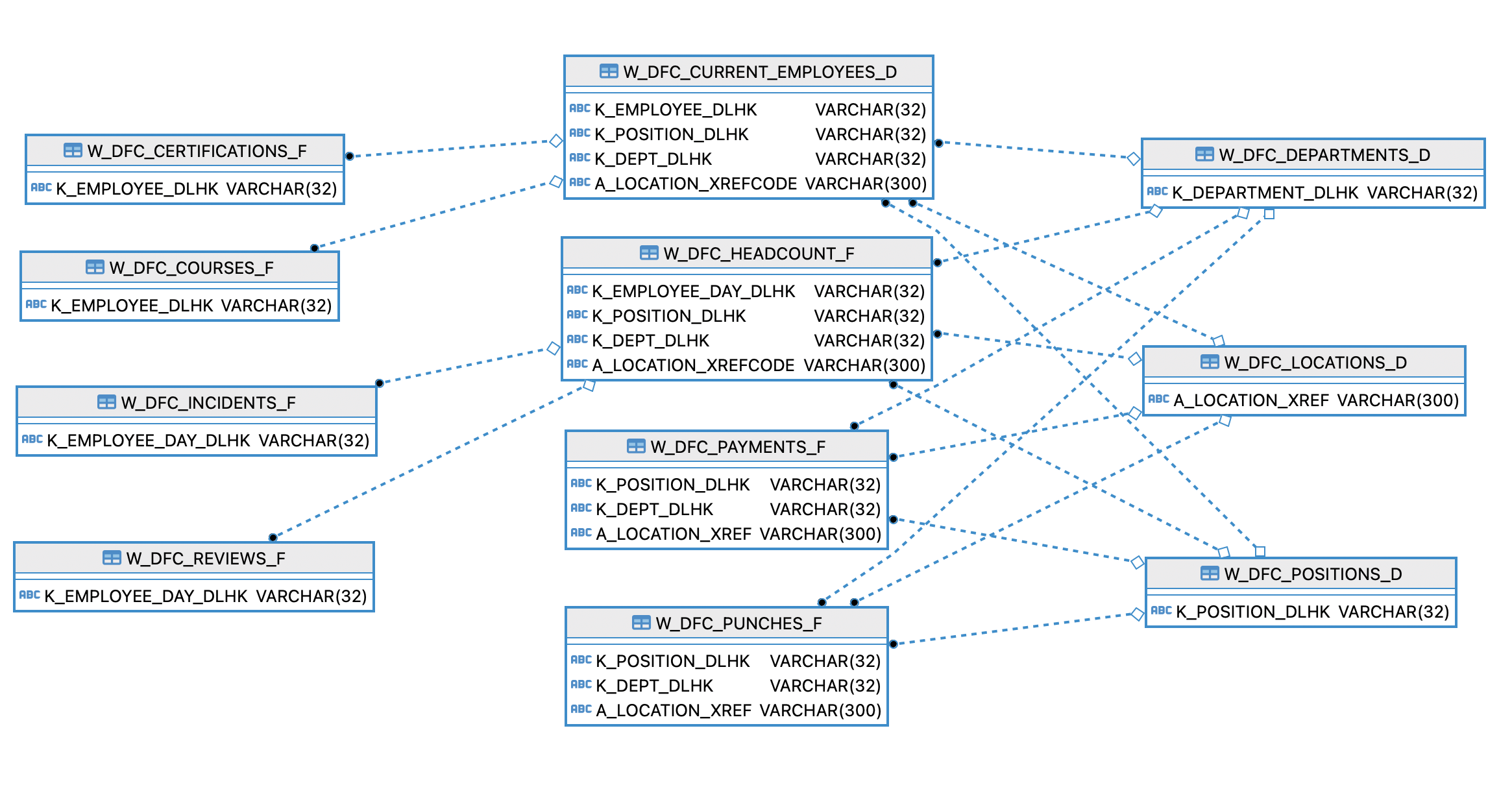
Schema Details (ER Diagram)
This entity relationship diagram (ERD) provides you with information about what entities/tables DLH is provided for you out of the box and how they are related to one another.