
Microsoft Teams
DLH.io documentation for Microsoft Teams
Microsoft Teams is a messaging app for your organizations, providing a workspace for real-time collaboration and communication, meetings, file and app sharing, all in one place, all in the open, and accessible to everyone.
DLH.io provides this integration in order for organizations to leverage analytically basic concepts such as who, what, when users scheduled or participated in meetings and events to help align these data points with other relevant business domain KPIs such as for sales, recruiting, product demonstrations, etc.
Setup Instructions
Follow the setup steps guide for configuring your Microsoft Teams connection to enable data to flow into your destination via DLH.
Supported Features
Here are key features supported for this connector.
| Sync Feature | Supported | Details |
|---|---|---|
| Custom Data and Development | ✓ | Ability to enhance connector upon request |
| Historical Re-Load/Load | ✓ | |
| Incremental/Delta Load | ✓ | Gets most recent records and changes |
| Column Selection | ✓ | |
| Column Hashing | ✓ | |
| Re-Sync Table/Entity | ✓ | Select at the table level to reload data history (on next Sync Bridge run) |
| Custom Queries | Utilizing SQL Data Query Connector | |
| Custom Data | ||
| Captures Deleted Rows | ✓ | On all supported tables |
| API Sync Bridge Initiation | ✓ | |
| Priority Scheduling | ✓ | |
| Private VPC/Link | ☂ | |
| DLH Data Model Available | - |
If you have any questions about these supported features please reach out to our Customer Support team.
Details on Sync Processing
For this connector, we believe the sync processing is straightforward. We've provided a number of details, steps, and other guidance here and in the setup steps guide. Be sure to also check the change log and notes page from time to time for any changes.
Helpful Troubleshooting Information
The following scenarios we've discussed with users of this connector which may help to understand how Microsoft Teams allows customer access to metadata and data access in general:
-
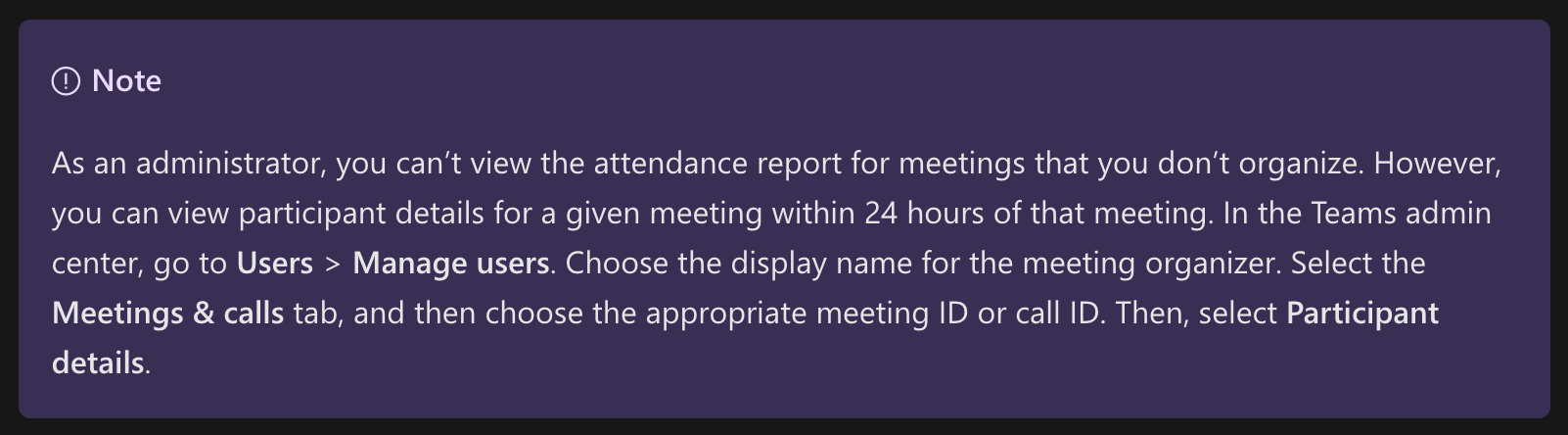
Can a user see meetings or meeting details if they did not create the meeting?
-
In this document from Microsoft, https://learn.microsoft.com/en-us/microsoftteams/teams-analytics-and-reports/meeting-attendance-report, we can see that access to meetings not created by the user authorized in the DLH.io Teams connector will only be able to see meetings not created by them for 24 hours. Any meetings outside of this window may result in information not captured or possibily warnings thrown in the DLH.io logs.
-
One option would be to create a connector for each user and only select certain entities for retrieval. Please contact DLH.io support regarding this approach first.
-
-
What permissions are required for teams access?
- The user creating the DLH.io Teams connector should have the Teams Administrator permission
-
Where do Microsoft Teams go to update privileges and settings for granular access and control over the Teams application?
- As an administrator of your Organization's Microsoft Teams application, the admin area seems to be located here, https://admin.teams.microsoft.com/
-
Warning messaging on various entities.
- The following messages indciate that while a meeting was scheduled nobody attended the meeting:
- Error occured while fetching - ATTENDANCE_REPORT
{"action": "DONE","actionType": "RETRIEVE","bridgeName": "SYnc Teams","bridgeGuid": "2ba1bc573fe3415bb27719fee0a42482","data": {"entity_type": "MICROSOFT_TEAMS_ENTITY","entity_name": "``ATTENDANCE_REPORT``","entity_step_description": "Error occurred while fetching attendanse report"},"created_ts": {"seconds": 1696951020,"nanos": 0},"created_dts": "Tue, 10 Oct 2023 15:17:00 PM","customMessage": "{\"error\":{\"code\":\"General\",\"message\":\"User ID in token(6e338409-8a41-4bf4-8b04-22f036fad5d8) is not the organizer of the queried meeting.\",\"innerError\":{\"request-id\":\"8d5d4016-ea87-41df-aeb1-0dc8a7acd132\",\"date\":\"2023-10-10T15:17:00\",\"client-request-id\":\"8d5d4016-ea87-41df-aeb1-0dc8a7acd132\"}}}","logLevel": "WARNING"}
- Error occured while fetching - ONLINE_MEETING
{"action": "DONE","actionType": "RETRIEVE","bridgeName": "SYnc Teams","bridgeGuid": "2ba1bc573fe3415bb27719fee0a42482","data": {"entity_type": "MICROSOFT_TEAMS_ENTITY","entity_name": "``ONLINE_MEETING``","entity_step_description": "Error occurred while fetching online meeting"},"created_ts": {"seconds": 1696951012,"nanos": 0},"created_dts": "Tue, 10 Oct 2023 15:16:52 PM","customMessage": "{\"error\":{\"code\":\"NotFound\",\"message\":\"An error has occurred.\",\"innerError\":{\"request-id\":\"af647ad8-ebd3-4b77-bbab-f4221d982631\",\"date\":\"2023-10-10T15:16:52\",\"client-request-id\":\"af647ad8-ebd3-4b77-bbab-f4221d982631\"}}} ::: Meeting URL ::: https://graph.microsoft.com/v1.0/me/onlineMeetings?$filter=joinWebUrl%20eq%20'https%3A%2F%2Fteams.microsoft.com%2Fl%2Fmeetup-join%2F19%253ameeting_M2RlZmZjMjQtMGY0OC00ZGVhLWJkMTEtMTRkYmM1Y2U0N2Y0%2540thread.v2%2F0%3Fcontext%3D%257b%2522Tid%2522%253a%2522dad8ba0a-d2e4-4f58-a9e5-02b54650c85e%2522%252c%2522Oid%2522%253a%25226e338409-8a41-4bf4-8b04-22f036fad5d8%2522%257d'","logLevel": "WARNING"}
- Error occrued while fetching - EVENT
{"action": "DONE","actionType": "RETRIEVE","bridgeName": "Sync Teams","bridgeGuid": "993eb42e57c4441e99f61257346259c9","data": {"entity_type": "MICROSOFT_TEAMS_ENTITY","entity_name": "``EVENT``","entity_step_description": "Error occurred while fetching event"},"created_ts": {"seconds": 1685112931,"nanos": 0},"created_dts": "Fri, 26 May 2023 14:55:31 PM","customMessage": "{\"error\":{\"code\":\"ResourceNotFound\",\"message\":\"Resource could not be discovered.\",\"innerError\":{\"date\":\"2023-05-26T14:55:31\",\"request-id\":\"2c5fcfdc-43bb-4558-96e5-42422d6c3241\",\"client-request-id\":\"2c5fcfdc-43bb-4558-96e5-42422d6c3241\"}}}","logLevel": "WARNING"}
- Error occured while fetching - ATTENDANCE_REPORT
- The following error message indicates that the person who authorized the Teams Source Connector did so using a personal account. Updated to a work or school account in Microsoft Teams.
- Error occured while fetching - CHANNEL
"action": "DONE","actionType": "RETRIEVE","bridgeName": "Sync Teams","bridgeGuid": "993eb42e57c4441e99f61257346259c9","data": {"entity_type": "MICROSOFT_TEAMS_ENTITY","entity_name": "``CHANNEL``","entity_step_description": "Error occurred while fetching channel"},"created_ts": {"seconds": 1685112940,"nanos": 0},"created_dts": "Fri, 26 May 2023 14:55:40 PM","customMessage": "{\"error\":{\"code\":\"AuthenticationError\",\"message\":\"Error authenticating with resource\",\"innerError\":{\"date\":\"2023-05-26T14:55:40\",\"request-id\":\"40901727-e1b3-4982-af39-6ad8d957aaa5\",\"client-request-id\":\"40901727-e1b3-4982-af39-6ad8d957aaa5\"}}}","logLevel": "WARNING"}
- Error occured while fetching - TEAM
{"action": "DONE","actionType": "RETRIEVE","bridgeName": "Sync Teams","bridgeGuid": "993eb42e57c4441e99f61257346259c9","data": {"entity_type": "MICROSOFT_TEAMS_ENTITY","entity_name": "``TEAM``","entity_step_description": "Error occurred while fetching team"},"created_ts": {"seconds": 1685112939,"nanos": 0},"created_dts": "Fri, 26 May 2023 14:55:39 PM","customMessage": "{\"error\":{\"code\":\"AuthenticationError\",\"message\":\"Error authenticating with resource\",\"innerError\":{\"date\":\"2023-05-26T14:55:39\",\"request-id\":\"1c9d392f-7840-46eb-886d-6b123197f2af\",\"client-request-id\":\"1c9d392f-7840-46eb-886d-6b123197f2af\"}}}","logLevel": "WARNING"}
- Error occured while fetching - CHANNEL
- The following messages indciate that while a meeting was scheduled nobody attended the meeting:
Issue Handling
If any issues occur with the authorization simply return to the sources page in DLH.io, edit the source details and click the Save & Test or Authorize Your Account or Re-Authorize Account button to confirm connectivity. If any issues persist please contact our support team via the DLH.io Support Portal.
Schema Details (ER Diagram)
This entity relationship diagram (ERD) provides you with information about what entities/tables DLH provides for you out-of-the-box and how they are related to one another.